A three-hundred-page book is three hundred pages. Nothing about printing one is hard except the arithmetic, and the arithmetic rules out almost every household printer.
#ad — buy links are affiliate links and we may earn a commission at no cost to you. How this site is funded. Prices as shown on Amazon as of November 12, 2026; Amazon’s own page is the price of record. Cost-per-page figures are arithmetic on supply prices we read on 27 September 2026 — here is the method.
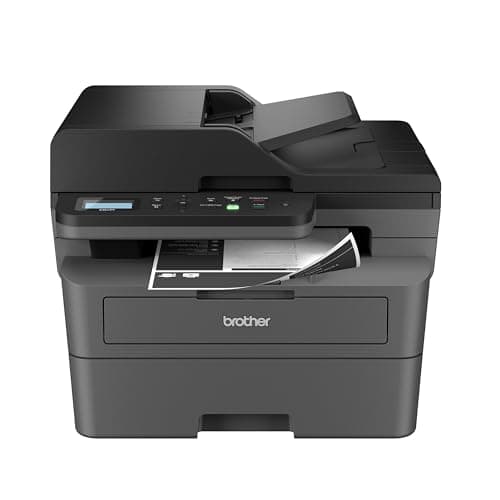
The printer for book printing is the Brother HL-L5210DW at $329.99: about 1.9 cents a page, 48 pages a minute, automatic duplex on Letter and Legal, and 350 sheets loaded so you can start a book and walk away. The budget pick is the $179.99 HL-L2460DW, which is the right answer for one project. If you also need to scan an existing book, the DCP-L2640DW adds a flatbed and a feeder for $209.99.
Can you print a book on a home printer?
Yes, and the only hard part is the arithmetic. A 300-page book is 150 sheets printed on both sides, so what you need is automatic two-sided printing, a cheap cost per page and enough paper capacity to avoid reloading. A mono laser on a business cartridge does a 300-page book for roughly $5.57 in toner. The same book on a cartridge inkjet would cost many times that.
How we picked
Books are long, double-sided and printed in one sitting, which narrows the criteria sharply.
Does it print both sides automatically? Non-negotiable. A book printed by hand-feeding every sheet is a lost weekend and an ordering error waiting to happen. Every pick here publishes it.
What does a page cost? Multiply by 300 and the differences stop being academic. This is the criterion that decided the ranking.
How much paper does it hold? Two inputs or a large cassette means a whole book goes in at once.
Can it scan? Only relevant if you are reproducing an existing book, but when it is relevant nothing else substitutes, so one pick covers it.
What a 300-page book costs to print
Toner or ink for one 300-page book, at rated ISO coverage
Printer and supply
Per page
One 300-page book
Brother HL-L6210DW, TN920UXXL
~1.3¢
$4.02
Brother HL-L5210DW, TN920XXL
~1.9¢
$5.57
Epson EcoTank, 522 bottles
~0.4¢
$1.20
Brother HL-L2460DW, TN830XL
~3.3¢
$9.83
Canon imageCLASS LBP6030w, Canon 125
~6.1¢
$18.18
Cartridge inkjet, published range
about 7.5 cents a page
Several times the above
Our arithmetic: supply price divided by rated ISO yield, times 300 pages. Paper is extra, at roughly a cent a sheet, and a 300-page book duplexed is 150 sheets. The method in full.
Notice that an ink tank printer is competitive on the toner figures here, and if you already own one, printing a book on it is perfectly sensible. The reason the lasers lead this page is speed and paper capacity rather than cost: a 150-sheet duplex job at 48 pages a minute is minutes, and the same job on a household inkjet is an afternoon of listening to it.
Duplex, imposition and the bit that goes wrong
Automatic duplex is the feature, but how you use it depends on the binding. For a perfect-bound or comb-bound book, straight duplex printing is right: page one on the front of sheet one, page two on the back. For a saddle-stitch booklet — folded and stapled through the spine — the pages have to be imposed, which means printing pages in an order no human would guess, and that is a job for your software rather than your printer. Most word processors and PDF readers have a booklet printing option that does the imposition for you.
The thing that actually goes wrong is the gutter. Text that looks correctly margined on screen can disappear into the fold or the glue once bound, so set an inside margin wider than the outside one and print five sheets as a test before committing 150. What duplex printing is, and when it is worth paying for.
Paper, and why it matters more than you expect
Standard office paper at 20 lb or 75 gsm is thin enough that duplex printing shows through from the other side, which on a book of solid text reads as gray and tiring. Slightly heavier stock — 24 lb or 90 gsm — costs very little more and makes a visible difference to a bound copy. It also feeds better through a duplexer, which reverses the sheet mid-path.
For the same reason, buy paper in reams rather than packets if you are printing books at all regularly. Paper is the larger half of the cost of a home-printed book on every row of the table above.
Specifications and running costs side by side, for the printers discussed on this page.
#ad — the price buttons are affiliate links and we may earn a commission at no cost to you. How this site is funded. Prices as shown on Amazon as of November 12, 2026; Amazon’s own page is the price of record.
Cost-per-page figures are our own arithmetic: supply price divided by the manufacturer’s rated page yield, using prices read on 27 September 2026 and yields rated at the ISO 5% coverage standard. They are not measured by us and they are not current prices. Every input, and the working · run the numbers for your own printing
The picks in detail
Best printer for book printing
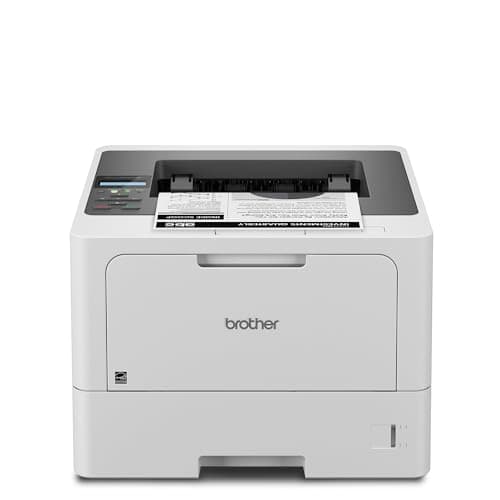
Brother HL-L5210DW
The cheapest way onto Brother's business toner family, which is the real reason to buy it: the cartridge is roughly half the cost per page of the household models.
Product photograph supplied by Amazon for this listing. We do not have this model in hand and have not photographed it ourselves.
#ad — we may earn a commission. How this site is funded. Prices as shown on Amazon as of November 12, 2026; Amazon’s own page is the price of record.
~1.9¢ per mono page
Based on a Brother TN920XXL super high-yield toner cartridge rated at 11,000 pages at $204.29, priced on 29 September 2026.
Brother TN920XXL super high-yield toner cartridge — rated 11,000 pages (ISO/IEC 19752), $204.29 at Brother USA, checked 29 September 2026
Yields are manufacturer-rated at the ISO 5% page-coverage standard, not measured by us, and real-world cost runs higher. Prices are not live: this is arithmetic on a price we read on the date shown, not a current price. How we calculate cost per page.
Gigabit Ethernet, dual-band wireless (2.4 GHz / 5 GHz) and Hi-Speed USB 2.0
Subscription
None required
What we like
TN920XXL toner works out at roughly half the cost per page of the household TN830XL
A genuine second paper source - a 100-sheet multi-purpose tray, not a one-sheet slot
48 pages a minute with auto duplex and Gigabit Ethernet
What you give up
Print only - no scanner, no copier, no fax
$150 more than the HL-L2460DW before you buy any toner
A replacement cartridge is a $200-plus purchase, even though each page is cheaper
Who it is for: anyone printing manuscripts, zines or bound copies in any quantity.
Book printing is a cost-per-page problem wearing a hobby costume, and this is the cheapest machine we cover that reaches Brother’s business cartridge. The TN920XXL is rated at 11,000 pages for $204.29 — about 1.9 cents a page — so a 300-page book costs roughly $5.57 in toner. Three hundred and fifty sheets across two inputs means you can load a whole book and walk away, at 48 pages a minute.
The duplexer matters more here than anywhere else on the site: a book is double-sided by definition, and automatic duplex on Letter and Legal halves your paper and removes the ordering problem entirely.
Honest cons. Print only — no scanner, which matters if you are reproducing an existing book. Mono only, so no color plates. The cartridge is a $200-plus purchase at a time, and Brother’s own store showed it out of stock when we last looked. The HL-L5210DW in full.
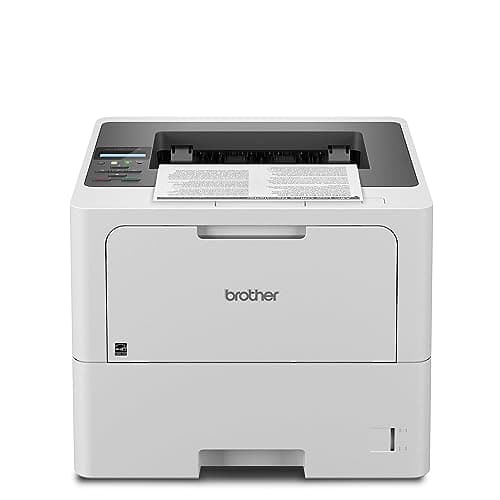
The lowest cost per page of any laser on this site, because it takes an 18,000-page cartridge. It is also the only model here with a 520-sheet main tray.
Product photograph supplied by Amazon for this listing. We do not have this model in hand and have not photographed it ourselves.
#ad — we may earn a commission. How this site is funded. Prices as shown on Amazon as of November 12, 2026; Amazon’s own page is the price of record.
~1.3¢ per mono page
Based on a Brother TN920UXXL ultra high-yield toner cartridge rated at 18,000 pages at $241.49, priced on 29 September 2026.
Brother TN920UXXL ultra high-yield toner cartridge — rated 18,000 pages (ISO/IEC 19752), $241.49 at Brother USA, checked 29 September 2026
Yields are manufacturer-rated at the ISO 5% page-coverage standard, not measured by us, and real-world cost runs higher. Prices are not live: this is arithmetic on a price we read on the date shown, not a current price. How we calculate cost per page.
Gigabit Ethernet, dual-band wireless (2.4 GHz / 5 GHz) and Hi-Speed USB 2.0
Subscription
None required
What we like
TN920UXXL toner is the cheapest per page of any cartridge we have priced
520-sheet main tray plus a 100-sheet multi-purpose tray, so two paper stocks stay loaded
50 pages a minute with auto duplex and Gigabit Ethernet
What you give up
Print only - no scanner or feeder
Brother publishes a higher headline capacity figure than the two trays alone account for, so read the tray specification before you assume a third tray is included
Nearly twice the price of a household mono laser before toner
Who it is for: a small press, a zine operation or anyone printing books in editions rather than one at a time.
Six hundred and twenty sheets standard means two books loaded at once, and 1,660 with the optional trays. The TN920UXXL is rated at 18,000 pages for $241.49, which is about 1.3 cents a page: a 300-page book for roughly $4.02 in toner, and about eighteen thousand pages before the cartridge needs changing. At 50 pages a minute a book takes minutes rather than an hour.
Honest cons. Print only, physically large, and wasted on someone printing one manuscript — toner has a shelf life and an 18,000-page cartridge can expire unfinished. What it costs to run.
#ad — we may earn a commission. How this site is funded. Prices as shown on Amazon as of November 12, 2026; Amazon’s own page is the price of record.
~3.3¢ per mono page
Based on a Brother TN830XL high-yield toner cartridge rated at 3,000 pages at $98.29, priced on 27 September 2026.
Brother TN830XL high-yield toner cartridge — rated 3,000 pages (ISO/IEC 19752), $98.29 at Brother USA, checked 27 September 2026
Yields are manufacturer-rated at the ISO 5% page-coverage standard, not measured by us, and real-world cost runs higher. Prices are not live: this is arithmetic on a price we read on the date shown, not a current price. How we calculate cost per page.
Dual-band wireless (2.4 GHz / 5 GHz), Ethernet or USB
Subscription
None required
What we like
Toner does not dry out, so it is ideal if you print in occasional bursts
Automatic two-sided printing at 36 pages per minute
Brother has publicly denied blocking third-party toner with firmware
What you give up
Black only - no color at all
Cost per page is roughly ten times a tank printer's
The 700-page starter cartridge runs out fast; budget for a TN830XL
Who it is for: someone printing one book, or a few manuscripts a year.
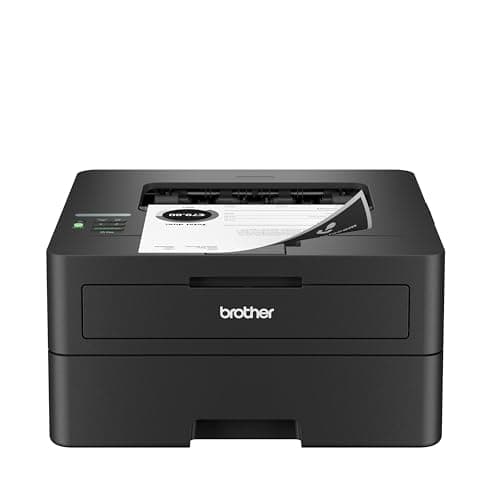
For a single project this is the right purchase and the business machines are not. It has the feature that actually matters — automatic two-sided printing — at 36 pages a minute for $179.99, and at about 3.3 cents a page a 300-page book costs roughly $9.83 in toner. That is the right answer unless you are printing books repeatedly.
Honest cons. One 250-sheet input, so a long book needs reloading. Household cartridge ladder, so roughly double the per-page cost of the HL-L5210DW. Mono only, no scanner, 700-page starter cartridge. The full breakdown.
#ad — we may earn a commission. How this site is funded. Prices as shown on Amazon as of November 12, 2026; Amazon’s own page is the price of record.
~3.3¢ per mono page
Based on a Brother TN830XL high-yield toner cartridge rated at 3,000 pages at $98.29, priced on 27 September 2026.
Brother TN830XL high-yield toner cartridge — rated 3,000 pages (ISO/IEC 19752), $98.29 at Brother USA, checked 27 September 2026
Yields are manufacturer-rated at the ISO 5% page-coverage standard, not measured by us, and real-world cost runs higher. Prices are not live: this is arithmetic on a price we read on the date shown, not a current price. How we calculate cost per page.
50-page document feeder, so scanning a stack is one action
Auto duplex printing at 36 pages per minute
Same TN830 toner family as the HL-L2460DW, with the same cost per page
What you give up
Mono only
Thirty dollars more than the print-only model for hardware you may not need
Toner is far dearer per page than bottle ink
Who it is for: anyone reproducing, digitizing or reprinting an existing book as well as printing one.
A flatbed is the only way to scan a bound page without destroying the book, and the 50-page document feeder handles loose manuscript pages at speed. Add automatic two-sided printing, 36 pages a minute, Ethernet and dual-band wireless for $209.99 and this is the most useful single machine for a bookbinding project.
Honest cons. Mono only. Household cartridge ladder at about 3.3 cents a page. The feeder scans one side at a time, and scanning a thick bound book on a flatbed is slow and fiddly whatever the machine. What it costs to run.
+−What is the best printer for printing a book at home?
The Brother HL-L5210DW at $329.99: about 1.9 cents a page, 48 pages a minute, automatic two-sided printing and 350 sheets loaded. For a single project the $179.99 HL-L2460DW does the same job more slowly for less.
+−How much does it cost to print a 300-page book at home?
Roughly $5.57 in toner on a business-cartridge laser, or about $9.83 on a household one, at rated ISO coverage. Add roughly $1.50 for 150 sheets of paper. On a cartridge inkjet it would be several times that.
+−Do I need a duplex printer to print a book?
Not strictly, but printing 150 sheets by hand-feeding each one twice is a lost weekend and an easy way to get the ordering wrong. Every printer on this page publishes automatic two-sided printing.
+−Can I print a booklet with the pages in the right order?
Yes — that is called imposition, and your word processor or PDF reader does it, not the printer. Look for a booklet or saddle-stitch printing option, and test on five sheets before committing a whole book.
+−What paper should I use for a home-printed book?
Slightly heavier than standard office paper — around 24 lb or 90 gsm. It reduces show-through on duplex pages, feeds better through a duplexer and makes a bound copy feel like a book rather than a printout.