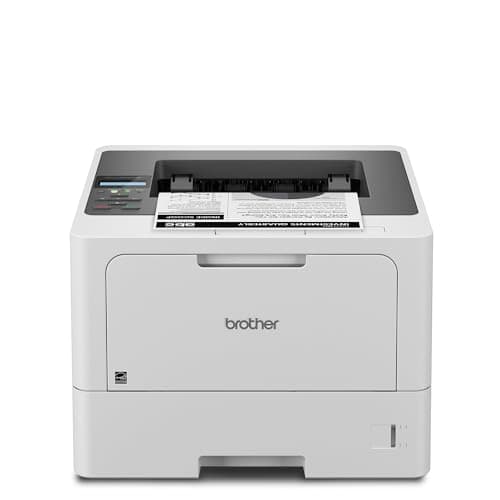
This printer makes no sense at all on a spec sheet and a great deal of sense on a spreadsheet. It is $329.99 for a machine that prints black text and nothing else, when $179.99 buys a Brother that prints the same black text at the same quality. The difference is one cartridge, and whether that cartridge is worth $150 depends entirely on how many pages a month come out of the thing. Here is the arithmetic, and a plain list of the people who should buy something cheaper.
Cost to run
Brother names two black cartridges on this model’s own specification page: the TN920 that ships in the box, rated at 3,000 pages, and the Brother TN920XXL super high-yield toner cartridge rated at 11,000 pages at ISO/IEC 19752. We read $204.29 for the replacement on Brother’s own store on 29 September 2026, which works out at about 1.9 cents a page.
Now hold that against the cartridge in Brother’s household lasers. The Brother TN830XL high-yield toner cartridge that feeds the HL-L2460DW, the DCP-L2640DW and the MFC-L2820DW is rated at 3,000 pages at $98.29 — about 3.3 cents. Same brand, same dry toner, same black on the page, and a little under twice the cost for every sheet.
| If you print | Toner over 3 years | Total with the printer |
|---|---|---|
| 100 pages a month | $67 | $397 |
| 300 pages a month | $201 | $531 |
| 800 pages a month | $535 | $865 |
Supplies only in the middle column; sticker price plus supplies in the right one. Mono pages at the manufacturer’s rated yield and the supply price we read on 27 September 2026. Real cost runs higher because rated yields assume 5% page coverage. The full method.
Read the right-hand column rather than the middle one. At 100 pages a month the printer price dominates the total so completely that the cartridge advantage is academic — buy the cheap machine. At 300 pages a month the two paths are within a rounding error of each other. At 800 the toner is the whole bill, the $150 of extra hardware has paid for itself, and the cheap printer has quietly become the expensive one. Put your own volume in rather than taking our word for where that line falls.
The 3,000-page cartridge in the box
The cartridge the printer arrives with is not the cartridge the cost per page is calculated on. Brother publishes the included TN920 at 3,000 pages, so the first replacement lands at a bit over a quarter of the headline yield. That is disclosed on the specification sheet rather than hidden, but it does mean year one costs more than the long-run figure implies, and it is worth budgeting a TN920XXL before the machine starts asking for one.
Brother’s wider business range also includes a TN920UXXL rated at 18,000 pages, at about 1.3 cents a page. It is not named on the HL-L5210DW specification page we read, so we do not tell you it fits this printer. That is not a claim that it does not — it is a refusal to invent a compatibility fact you would spend $240 on. Buy what Brother names for your model, which here is the TN920XXL.
The $20 question: this or the HL-L6210DW
The genuinely difficult comparison is not against the cheap household lasers. It is against this printer’s own bigger sibling, which costs $349.99 — twenty dollars more — and takes the 18,000-page cartridge at about 1.3 cents a page.
| HL-L5210DW | HL-L6210DW | |
|---|---|---|
| List price | $329.99 | $349.99 |
| Speed | Up to 48 ppm | Up to 50 ppm |
| Main tray | 250 sheets | 520 sheets |
| Multi-purpose tray | 100 sheets | 100 sheets |
| Maximum with optional trays | 1,390 sheets | 1,660 sheets |
| Named replacement toner | TN920XXL, 11,000 pages | TN920UXXL, 18,000 pages |
| Cost per page | ~1.9¢ | ~1.3¢ |
| Recommended monthly volume | Up to 5,000 pages | Up to 8,000 pages |
| Maximum monthly duty cycle | Up to 90,000 pages | Up to 125,000 pages |
Both columns read from each model's own specification page on brother-usa.com on 28 October 2026. Cost per page is our arithmetic on the Brother store cartridge prices in our sources.
On those numbers the bigger machine wins on almost every line for twenty dollars, which is an unusual thing for us to have to write. If both are in stock and your budget stretches to $349.99, the HL-L6210DW is the better buy and we will not pretend otherwise.
Two things keep the HL-L5210DW in the conversation anyway. The first is availability: these are both business-channel machines and they go in and out of stock independently, which is exactly what we found on the day we checked. The second is the size of the cartridge purchase. An 18,000-page cartridge is the lowest cost per page on this site and also the largest single supply bill on it; if you print 200 pages a month, that cartridge is a seven-year supply bought in one go, and the 11,000-page one is the more sensible object to own.
Paper handling
Brother publishes a 250-sheet main tray plus a separate 100-sheet multi-purpose tray — 350 sheets standard across two inputs — expandable to 1,390 sheets with optional LT-5505 or LT-6505 trays. The multi-purpose tray is the specification worth paying attention to, because on the household models the second input is a single-sheet manual slot. A hundred sheets of letterhead, card or envelopes can live there permanently without you unloading plain paper to use them. Why a second paper source matters more than it sounds.
Automatic two-sided printing is supported on Letter and Legal, and both inputs accept Legal. That combination is rarer than you would expect — plenty of lasers take legal paper in the tray and then refuse to duplex it — which is why this model appears in our legal-size roundup and in the cardstock picks.
Speed, and what a duty cycle actually tells you
Brother lists up to 48 pages a minute, a first page out of standby in up to 6.7 seconds and 256 MB of memory. The first-page figure is the one you notice; nobody waits for page 46.
The more useful pair is the volume rating. Brother publishes a recommended monthly print volume of up to 5,000 pages and a maximum monthly duty cycle of up to 90,000. Those are not the same claim. The recommended figure is what the machine is built to do every month for its service life; the duty cycle is the ceiling the mechanism can survive. Buy against the recommended number and ignore the ceiling, which exists mainly to appear in comparison tables.
Five thousand pages a month is ten reams. If that sounds absurd for your house, it is — this is a small-office machine, and the honest recommendation for a household that prints homework is a far cheaper one.
The drum unit nobody budgets for
Every laser has a second consumable. The DR920 drum on this model is rated at approximately 45,000 pages and is replaced separately from the toner. At 300 pages a month you will not reach it for twelve years. At the 5,000-page recommended volume you reach it inside a year, and it becomes a recurring line item that no cost-per-page figure on this page includes. The difference between a drum and a toner cartridge is five minutes well spent before buying any laser printer.
One thing to check before you buy
On 28 October 2026 Brother’s own US store listed this printer at $329.99 and showed it out of stock. It was not marked discontinued, and a retailer offer was live at the same figure when we last refreshed prices. We report that as a dated snapshot rather than a verdict: business lasers rotate through stock states constantly, and the price button on this page goes to a live listing precisely so you are reading today’s availability rather than ours. If it has gone, the HL-L6210DW and the HL-L2460DW are the two machines either side of it.
The subscription question
Nothing about this printer requires a plan. Brother sells an optional Refresh EZ Print subscription that ships toner automatically, and the machine prints perfectly normally having never been enrolled. You buy a cartridge, from whoever you like, and put it in. That is a materially different arrangement from a printer that stops working when a plan lapses, and the distinction is the reason this site exists. How automatic toner plans actually work.
On third-party toner, the honest position is that Brother is the brand most often recommended by people who want supply choice, and that in early 2025 that reputation was publicly challenged when allegations circulated that firmware updates were disabling compatible cartridges. Brother denied it directly, stating its firmware updates do not block third-party ink or toner while noting it performs a genuine-supply check during troubleshooting. We report that as a documented dispute rather than a settled fact — the full account, with sources.
Networking
Gigabit Ethernet, dual-band wireless on 2.4 and 5 GHz, and Hi-Speed USB 2.0. For a printer shared by several people the cable is the feature: a machine on Ethernet does not vanish from the network when the router reshuffles its channels or renews a lease. Network laser printers covers what that is worth in practice.
Who should buy something else
- You need to scan or copy. There is no glass and no feeder here. The MFC-L2820DW has a 50-page document feeder at $279.99, on the dearer household cartridge, and the laser all-in-one roundup sets out the trade.
- You print under about a hundred pages a month. The HL-L2460DW is $179.99 and prints the same black pages. At low volume the $150 you save outlasts the per-page difference by years.
- You can stretch to $349.99. The HL-L6210DW is twenty dollars more for a 520-sheet tray and the cheapest laser page on this site. Buy that instead if it is in stock.
- You print in color. There is no color mode to switch on. A tank printer is usually the cheaper way to get color, by a wide margin.
- You want the lowest cost per page, full stop. A refillable ink tank printer beats this machine by several times on mono pages. It is slower, it wants using every couple of weeks to stop the head clogging, and it is the right answer anyway for a lot of households — the comparison in full.