Skip to content
Tank & Toner
A neat stack of printed documents on a desk

By Use Case

Best printers with fax

Fax is the one feature that is vanishing from printers while a stubborn set of buyers still genuinely needs it. Only three machines we cover publish a modem at all.

By Ryder M. · Published November 11, 2026

Quick picks

Our ranked picks for best printers with fax, with the cost per page beside each one. Tap a row to jump to the full write-up.

Our ranked picks for best printers with fax, with the cost per page beside each one. Tap a row to jump to the full write-up.
#ProductBest forCost per pagePrice
1
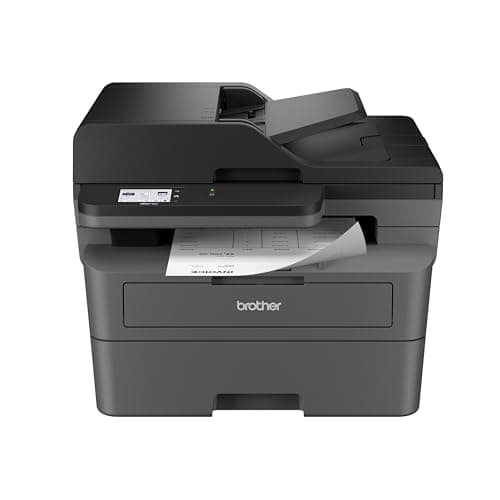
Brother MFC-L2820DW — Amazon product photo
Brother MFC-L2820DW$279.99, a 33.6K modem, 50-page feeder, 34 ppm, about 3.3¢ a page
Best printer with fax, and the budget pick~3.3¢
2
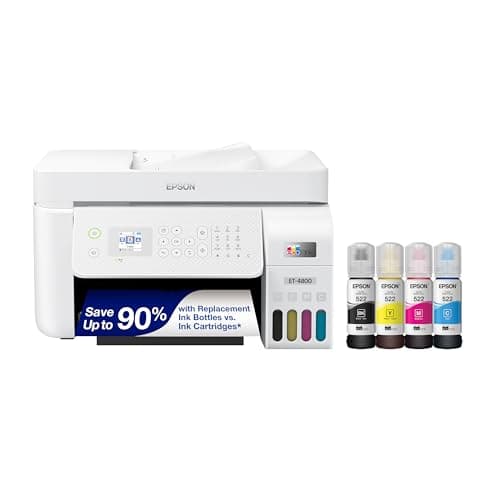
Epson EcoTank ET-4800 — Amazon product photo
Epson EcoTank ET-4800Fax, a document feeder and Ethernet on refillable bottles, about 1.1¢ an ISO color page
Best color printer with fax~0.4¢
3
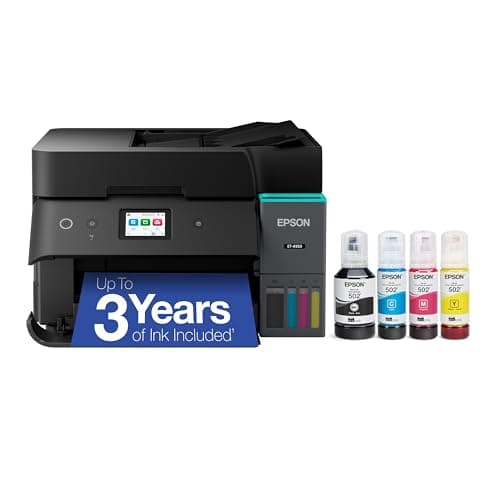
Epson EcoTank ET-4950 — Amazon product photo
Epson EcoTank ET-4950Fax, auto duplex, a 250-sheet tray and Ethernet, about 1.2¢ an ISO color page
Best for an office that faxes often~0.3¢

#ad — buy links are affiliate links and we may earn a commission at no cost to you. How this site is funded. Prices as shown on Amazon as of November 12, 2026; Amazon’s own page is the price of record. Cost-per-page figures are arithmetic on supply prices we read on 27 September 2026 — here is the method.

The printer to buy if you need fax is the Brother MFC-L2820DW at $279.99, for any office whose documents are black text: a 33.6K modem with 400 pages of fax memory, a 50-page document feeder, and about 3.3 cents a page. It is also the budget pick, because it is the cheapest of the three. If you need color as well, the Epson EcoTank ET-4800 adds refillable tanks; if you fax daily, the ET-4950 adds a duplexer and a bigger tray.

Do printers still come with fax?

A shrinking number do. Of the seventeen printers we cover, three publish a fax modem: the Brother MFC-L2820DW, the Epson EcoTank ET-4800 and the Epson EcoTank ET-4950. On most current consumer printers fax has simply been removed, and the model naming is the tell — on Brother, machines that fax carry the MFC prefix, while DCP and HL models do not. Check the specification sheet for a modem speed before you buy, because “all-in-one” no longer implies fax.

How we picked

Fax is a hard capability filter rather than a preference, so the shortlist wrote itself. Among the machines that qualified, these are the four questions that decided the order.

  1. Does the manufacturer publish a fax modem? Not “fax to cloud” or an app-based service — an actual modem with a published speed that connects to a phone line. Only three machines we cover do.
  2. Is there fax memory? This is the specification everyone ignores and then needs. Without it, a fax arriving while the machine is out of paper or busy simply fails. Brother publishes 400 pages of fax memory on our top pick.
  3. Is there a document feeder? Faxing is the original multi-page job. All three picks have one, and all three scan a single side at a time, which we say rather than leaving you to discover.
  4. What does a page cost? Our own arithmetic on published supply prices and rated yields. Fax users receive documents as well as sending them, so the cost of an incoming page matters as much as the cost of one you chose to print.

Who still genuinely needs fax

It is easy to be sniffy about fax, and it is also beside the point: the people who need it are not choosing to. Medical practices exchange records over fax because the rules they work under treat a direct point-to-point transmission differently from email. Legal and title work still runs on faxed signatures in many jurisdictions. Real estate agents fax contracts because the other side’s brokerage does. Some government and insurance offices accept nothing else.

What all of those have in common is that the requirement comes from somebody else. You cannot talk your counterparty out of it, so the machine has to have a modem. That is why this page exists as a capability filter rather than a recommendation: if you need fax, the shortlist is three machines long and nothing else on this site is a substitute.

The phone line problem, which is the real catch

A fax modem needs a phone line, and most households and small offices no longer have one. This is the thing that goes wrong after the printer arrives, so it is worth settling before you buy rather than after.

A traditional copper landline works. Cable or fiber internet phone service — a voice line delivered over your internet connection, often called VoIP — sometimes works and sometimes does not, because fax was designed for an analog circuit and a digital voice service can compress or re-time the audio in ways the modem cannot follow. Providers often recommend dropping the modem to a slower speed, which is why the 33.6K number on a specification sheet is adjustable in the menu rather than fixed. Owner reports of faxing successfully over internet phone service on these machines do exist, but it is not something we can promise and we are not going to.

How each pick can be connected, and what it publishes
PrinterFaxDocument feederAuto duplexWired network
Brother MFC-L2820DW33.6K modem, 400-page memory50 pagesYesEthernet
Epson EcoTank ET-4800YesYesNot publishedEthernet
Epson EcoTank ET-4950YesYesYesEthernet

Read from Brother USA and Epson US product pages, re-verified on 11 November 2026. “Not published” means the maker does not state the feature, which is not the same as the machine lacking it — we will not claim a feature we cannot source. Epson publishes fax and a document feeder for both EcoTank models without naming a modem speed, so we do not quote one.

If you have no phone line at all and cannot get one, a fax printer is the wrong purchase and an online fax service is the right one. We would rather say that than sell you a modem you cannot plug in. In that case, buy the printer that suits your actual printing — the best printers under $500 is the page for that — and handle fax in software.

What faxing costs you in supplies

Fax has a cost profile nothing else on this site shares: you do not choose what arrives. An incoming twenty-page document prints whether you wanted twenty pages or not, which makes cost per page less negotiable than usual and makes automatic two-sided printing worth more than it looks.

Cost of a received 20-page fax, at rated ISO coverage
Printer and supplyPer pageA 20-page fax
Epson EcoTank ET-4950, 502 bottles~0.3¢$0.07
Epson EcoTank ET-4800, 522 bottles~0.4¢$0.08
Brother MFC-L2820DW, TN830XL~3.3¢$0.66
Brother MFC-L2820DW, standard TN830~5.1¢$1.02
Cartridge inkjet, published rangeabout 7.5 cents a pageSeveral times the above

Our arithmetic on dated published supply prices divided by rated ISO yields, plus roughly a cent a sheet for paper — the method. The last two rows are the same printer on its two cartridge sizes, which is the cheapest decision on this page.

Note the two Brother rows. They are the identical machine, and buying the standard cartridge instead of the high-yield one costs you about 5.1 cents a page instead of 3.3 cents for the same toner. On a machine that receives documents it did not ask for, that is the first thing to get right. The cheap-toner roundup works through the cartridge ladders in more detail.

Four things to check before you order

  1. The model prefix. On Brother, only MFC models fax. A DCP or HL model with an otherwise identical specification has no modem, and the model numbers are close enough to order the wrong one.
  2. A published modem speed or fax memory figure. If the specification sheet mentions fax only in marketing copy and never names a modem, be suspicious — some machines offer app-based or cloud-forwarded fax rather than a modem, which is a different product.
  3. What your phone service actually is. Copper landline, internet voice service, or nothing. This decides whether the machine can do the job at all, and it is the step people skip.
  4. Whether a subscription is attached to the supplies. None of these three requires one, which is deliberate — a fax machine that stops printing because a payment failed is worse than no fax machine. How to run any printer without one.
Specifications and running costs side by side, for the printers discussed on this page.
PrinterSupply typeMono per pageColor per pageAuto duplexFeederPrice
Brother MFC-L2820DWToner~3.3¢mono onlyYesYes$269.99 · View on Amazon
Epson EcoTank ET-4800Ink bottles~0.4¢~1.1¢Not statedYes$292.90 · View on Amazon
Epson EcoTank ET-4950Ink bottles~0.3¢~1.2¢YesYes$455.00 · View on Amazon$499.99 · 9% off

#ad — the price buttons are affiliate links and we may earn a commission at no cost to you. How this site is funded. Prices as shown on Amazon as of November 12, 2026; Amazon’s own page is the price of record.

Cost-per-page figures are our own arithmetic: supply price divided by the manufacturer’s rated page yield, using prices read on 27 September 2026 and yields rated at the ISO 5% coverage standard. They are not measured by us and they are not current prices. Every input, and the working · run the numbers for your own printing

The picks in detail

Best printer with fax, and the budget pick

Brother MFC-L2820DW

The small-office version of Brother's household mono laser: same cheap TN830 toner, but with a fifty-page feeder, fax and a scanner bolted on.

Brother MFC-L2820DW — Amazon product photo

Product photograph supplied by Amazon for this listing. We do not have this model in hand and have not photographed it ourselves.

$269.99 · View on Amazon

#ad — we may earn a commission. How this site is funded. Prices as shown on Amazon as of November 12, 2026; Amazon’s own page is the price of record.

~3.3¢ per mono page

Based on a Brother TN830XL high-yield toner cartridge rated at 3,000 pages at $98.29, priced on 27 September 2026.

  • Brother TN830XL high-yield toner cartridge — rated 3,000 pages (ISO/IEC 19752), $98.29 at Brother USA, checked 27 September 2026

Yields are manufacturer-rated at the ISO 5% page-coverage standard, not measured by us, and real-world cost runs higher. Prices are not live: this is arithmetic on a price we read on the date shown, not a current price. How we calculate cost per page.

List price
$279.99 at Brother USA, checked 29 September 2026
Supply type
Toner cartridge
Print speed
Up to 34 pages per minute
Two-sided printing
Automatic
Document feeder
50-page automatic document feeder
Connectivity
Ethernet, dual-band wireless (2.4 GHz / 5 GHz) and Hi-Speed USB 2.0
Subscription
None required

What we like

  • Fifty-page document feeder and auto duplex at 34 pages a minute
  • Runs the same TN830XL toner as Brother's cheaper models, so no cost-per-page penalty for the extra hardware
  • Ethernet as well as dual-band Wi-Fi, which matters when several people share it

What you give up

  • Mono only - no color at all
  • Seventy dollars more than the DCP-L2640DW, and the difference is mostly the fax
  • The ADF scans one side only, so double-sided originals still need flipping

Who it is for: almost everyone who needs fax — a home office, a small practice, an agent — and whose documents are black text.

This is both our top pick and the cheapest machine on the page, which happens rarely enough to be worth saying plainly. Brother publishes a 33.6K fax modem with 400 pages of fax memory, which is the specification that matters when the line is busy or the machine is out of paper: faxes land in memory instead of failing. Around it you get a flatbed scanner with a 50-page automatic document feeder, copying, Ethernet, AirPrint and Mopria, 34 pages a minute and automatic two-sided printing, for $279.99.

The running cost is the other reason it leads. On the high-yield TN830XL, rated at 3,000 pages for $98.29, a page is about 3.3 cents, and a laser page arrives dry so an incoming fax can go straight into a file.

Honest cons. Mono only — no color printing and no color copies. The feeder scans one side of a page at a time, so faxing a double-sided original means turning the stack over. Paper handling is modest: a 250-sheet tray plus a single-sheet manual slot. And the box ships a 700-page starter cartridge rather than a full one. What it costs to run.

Specifications read from the manufacturer’s own product page on 29 September 2026. Full cost-to-run breakdown for the Brother MFC-L2820DW →

Best color printer with fax

Epson EcoTank ET-4800

The ET-2800's running cost with the office hardware bolted on: a document feeder, wired Ethernet and fax. Worth it only if you actually need one of those three.

Epson EcoTank ET-4800 — Amazon product photo

Product photograph supplied by Amazon for this listing. We do not have this model in hand and have not photographed it ourselves.

$292.90 · View on Amazon

#ad — we may earn a commission. How this site is funded. Prices as shown on Amazon as of November 12, 2026; Amazon’s own page is the price of record.

~0.4¢ per mono page · ~1.1¢ per color page

Based on a Epson 522 black ink bottle rated at 4,500 pages at $17.99, priced on 27 September 2026.

The color figure adds one per-page cost for each of the three color channels, because an ISO color page draws from all of them.

  • Epson 522 black ink bottle — rated 4,500 pages (ISO/IEC 24712), $17.99 at Epson US, checked 27 September 2026
  • Epson 522 color ink bottle — rated 7,500 pages (ISO/IEC 24712), $17.99 at Epson US, checked 27 September 2026

Yields are manufacturer-rated at the ISO 5% page-coverage standard, not measured by us, and real-world cost runs higher. Prices are not live: this is arithmetic on a price we read on the date shown, not a current price. How we calculate cost per page.

List price
Not published where we checked on 27 September 2026
Supply type
Refillable ink bottles
Two-sided printing
Not stated on the spec page we read
Document feeder
Automatic document feeder
Connectivity
Wireless and Ethernet
Subscription
None required

What we like

  • Same 522 ink and therefore the same cost per page as the cheaper EcoTanks
  • Automatic document feeder for multi-page scanning and copying
  • Wired Ethernet, which is more reliable than Wi-Fi for a shared printer

What you give up

  • Epson did not publish a list price on its product page when we checked
  • You pay for the feeder and the fax whether or not you use them
  • Still an inkjet, so it wants occasional use

Who it is for: an office that faxes and also needs color for everything else it prints.

Epson publishes fax, an automatic document feeder, wired Ethernet and a high-resolution flatbed scanner on this one, with print, scan and copy in color — and it runs on refillable 522 bottles rather than cartridges, at about 0.4 of a cent a mono page and 1.1 cents an ISO color page. If you fax occasionally but print color constantly, this is the machine that does not make you choose.

It is also the only pick here with a serious argument on supply cost for a low-volume fax user. A fax machine that sits idle for weeks still has to work on the day you need it, and bottle-fed ink makes the occasional head-cleaning cycle cost nothing worth counting.

Honest cons. Epson does not publish automatic two-sided printing for this model, which is a real gap on a document machine. One paper tray, and an inkjet document feeder is slower than a laser one. Ink is wet when it lands, so a long incoming fax wants a moment before you stack it. Our ET-4800 page.

Specifications read from the manufacturer’s own product page on 27 September 2026. Full cost-to-run breakdown for the Epson EcoTank ET-4800 →

Best for an office that faxes often

Epson EcoTank ET-4950

The current EcoTank that has everything a small office asks for - feeder, auto duplex, Ethernet and AirPrint - on the cheaper 502 ink. The price is the argument against it.

Epson EcoTank ET-4950 — Amazon product photo

Product photograph supplied by Amazon for this listing. We do not have this model in hand and have not photographed it ourselves.

$455.00 · View on Amazon$499.99 · 9% off

#ad — we may earn a commission. How this site is funded. Prices as shown on Amazon as of November 12, 2026; Amazon’s own page is the price of record.

~0.3¢ per mono page · ~1.2¢ per color page

Based on a Epson 502 black ink bottle rated at 7,500 pages at $24.99, priced on 27 September 2026.

The color figure adds one per-page cost for each of the three color channels, because an ISO color page draws from all of them.

  • Epson 502 black ink bottle — rated 7,500 pages (ISO/IEC 24712), $24.99 at Epson US, checked 27 September 2026
  • Epson 502 color ink bottle — rated 6,000 pages (ISO/IEC 24712), $16.99 at Epson US, checked 27 September 2026

Yields are manufacturer-rated at the ISO 5% page-coverage standard, not measured by us, and real-world cost runs higher. Prices are not live: this is arithmetic on a price we read on the date shown, not a current price. How we calculate cost per page.

List price
$499.99 at Epson US, checked 29 September 2026
Supply type
Refillable ink bottles
Print speed
18 ISO pages per minute black, 9 ISO pages per minute color
Two-sided printing
Automatic
Document feeder
Automatic document feeder
Connectivity
Wireless and Ethernet
Subscription
None required

What we like

  • Auto duplex and a document feeder together, which the cheap EcoTanks do not offer
  • 502 ink, the lowest cost per page of any Epson bottle family we have priced
  • AirPrint is named on Epson's own product page, so Macs and iPhones need no driver

What you give up

  • $499.99 at list - more than twice the cheapest EcoTank that prints the same pages for the same money per page
  • Still an inkjet, so it wants occasional use or the head can clog
  • 18 pages a minute is slow next to any mono laser

Who it is for: a practice or small business where faxing is part of the daily workflow rather than an occasional obligation.

Everything the ET-4800 does plus the two things a busy fax machine actually needs: automatic two-sided printing, so a long incoming document does not consume twice the paper, and a 250-sheet cassette so it does not run dry mid-transmission. Epson rates it at 18 ISO pages a minute black and 9 color, with wired Ethernet, an automatic document feeder and refillable 502 bottles at about 0.3 of a cent a mono page.

Honest cons. Epson lists it at $499.99, which is a lot to spend to gain a duplexer and a bigger tray over the ET-4800. Nine ISO color pages a minute is slow. And like every machine here, the feeder scans one side at a time. The full cost-to-run breakdown.

Specifications read from the manufacturer’s own product page on 29 September 2026. Full cost-to-run breakdown for the Epson EcoTank ET-4950 →

Questions people actually ask

What is the best printer with fax?

The Brother MFC-L2820DW at $279.99: a 33.6K fax modem with 400 pages of fax memory, a 50-page document feeder, automatic two-sided printing and about 3.3 cents a page. It is also the cheapest of the three fax machines we cover.

Do new printers still have fax?

Some do, but far fewer than a decade ago. Of the printers we cover, only three publish a fax modem. Check the specification sheet for a modem rather than trusting the words “all-in-one,” which no longer implies fax.

Can you fax without a phone line?

Not with the modem in the printer — that needs a line. Internet voice service sometimes works and sometimes does not, because fax was designed for an analog circuit. With no line at all, an online fax service is the right answer and the printer is irrelevant to it.

Is a laser or an ink tank printer better for faxing?

Laser, for most fax users: pages arrive dry and ready to file, and a laser survives sitting idle between transmissions without any maintenance. Choose an ink tank model if you also need cheap color for everything else you print.

What is fax memory and do I need it?

It is storage that holds an incoming fax when the machine cannot print it — out of paper, busy, or mid-job. Without it those faxes fail rather than waiting. Brother publishes 400 pages of it on the MFC-L2820DW; if you receive faxes unattended, it matters.

Do Brother DCP models fax?

No. On Brother, the MFC prefix means the machine faxes; DCP means print, copy and scan without a modem; HL means print only. The DCP-L2640DW and the MFC-L2820DW are otherwise close siblings, and fax is the main difference.

Sources