Check stock is heavier than paper and the print has to be permanent, so this is a laser job. What matters is the paper path, the toner cost and one thing about MICR nobody tells you.
#ad — buy links are affiliate links and we may earn a commission at no cost to you. How this site is funded. Prices as shown on Amazon as of October 17, 2026; Amazon’s own page is the price of record. Cost-per-page figures are arithmetic on supply prices we read on 27 September 2026 — here is the method.
For printing checks, the Brother MFC-L2820DW at $279.99 is the pick: a single-sheet manual feed slot for check stock, a 50-page feeder for scanning what goes with the payment, and about 3.3 cents a page. For a business printing runs of checks, the HL-L5210DW at $329.99 and its 100-sheet multi-purpose tray. For occasional household checks, the HL-L2460DW at $179.99.
How we picked
Check printing asks for three things a general-purpose printer may not have, so the ranking follows them in order: a paper source that takes heavier stock without unloading your plain paper, print that is dry and permanent the moment it leaves the machine, and a cost per page low enough that a monthly run is not an event.
Everything here is published paper handling from each manufacturer’s own specification page plus our own arithmetic on genuine cartridge prices. We have no units in hand and we have not tested check stock through any of them.
Why checks are a laser job
Toner is fused plastic. It is bonded to the surface with heat rather than absorbed, so a laser-printed check does not smudge under a thumb, run if it gets damp, or lift when it is handled through the banking system.
It is harder to alter. Liquid ink on plain stock can be lifted with solvent far more easily than fused toner, which is the practical security argument and the reason business check printing has always been laser.
It is dry on arrival. You can sign and send immediately. An inkjet check needs a moment, and a wet signature over wet ink is a mess.
Nothing dries out between runs. Checks are printed in bursts. Toner sits happily for months; liquid ink in an idle inkjet does not. Why that matters.
The lasers we cover, for check work
Printer
Second paper source
Scanner
List price
Per page
Brother MFC-L2820DW
Single-sheet manual feed slot
Flatbed plus 50-page ADF
$279.99
~3.3¢
Brother HL-L5210DW
100-sheet multi-purpose tray
None
$329.99
~1.9¢
Brother HL-L6210DW
100-sheet multi-purpose tray
None
$349.99
~1.3¢
Brother DCP-L2640DW
Not published
Flatbed plus 50-page ADF
$209.99
~3.3¢
Brother HL-L2460DW
Not published
None
$179.99
~3.3¢
Hardware as published on each Brother product page and recorded in our registry. Cost per page is our arithmetic on genuine cartridge prices and manufacturer-rated ISO yields; a check uses less toner than a full ISO page of text.
The MICR caveat, stated plainly
The band of stylised numbers along the bottom of a check is the MICR line, and it is designed to be read magnetically as well as optically. Printing it properly requires MICR toner, which contains iron oxide, in a cartridge sold specifically for that purpose — standard toner is not magnetic.
We do not stock, price or recommend MICR cartridges, and none of the supplies in our registry is one. If you are printing checks from blank stock including the MICR line, buy a MICR cartridge made for your exact model and confirm the arrangement with your own bank before you print a run. If you are printing onto pre-printed check stock that already carries the MICR line — which is what most small businesses and households do — standard toner is all you need, because the printer is only adding the payee, amount, date and memo.
Getting check stock through cleanly
Feed from the manual slot or multi-purpose tray wherever the machine has one. The main cassette bends the sheet more than heavier stock likes and makes misfeeds more likely.
Set the media type to heavy paper or thick in the driver, so the sheet slows through the fuser and the toner fuses properly.
Turn duplexing off. There is nothing on the back of a check, and the reversing path is one more place for an awkward sheet to jam.
Proof on plain paper first and hold it against a blank check up to a window. Thirty seconds, and it saves a ruined sheet of numbered stock.
Store blank checks locked away rather than loaded in a tray. This is the dull advice that makes the manual feed slot the right feature rather than a nicety.
What check printing costs
Very little, which is the point of doing it yourself. At 40 checks a month over three years the toner comes to $47 on the TN830XL machines and $27 on the HL-L5210DW — before the check stock itself, which will cost you more than the toner does. The business machine only wins on supplies once the volume is high enough to work through its much larger cartridge. Our invoice printing costs use the same arithmetic.
Specifications and running costs side by side, for the printers discussed on this page.
#ad — the price buttons are affiliate links and we may earn a commission at no cost to you. How this site is funded. Prices as shown on Amazon as of October 17, 2026; Amazon’s own page is the price of record.
Cost-per-page figures are our own arithmetic: supply price divided by the manufacturer’s rated page yield, using prices read on 27 September 2026 and yields rated at the ISO 5% coverage standard. They are not measured by us and they are not current prices. Every input, and the working · run the numbers for your own printing
The picks in detail
Best printer for printing checks
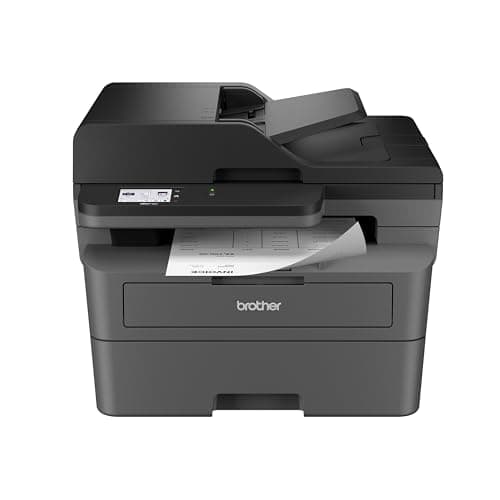
Brother MFC-L2820DW
The small-office version of Brother's household mono laser: same cheap TN830 toner, but with a fifty-page feeder, fax and a scanner bolted on.
Product photograph supplied by Amazon for this listing. We do not have this model in hand and have not photographed it ourselves.
#ad — we may earn a commission. How this site is funded. Prices as shown on Amazon as of October 17, 2026; Amazon’s own page is the price of record.
~3.3¢ per mono page
Based on a Brother TN830XL high-yield toner cartridge rated at 3,000 pages at $98.29, priced on 27 September 2026.
Brother TN830XL high-yield toner cartridge — rated 3,000 pages (ISO/IEC 19752), $98.29 at Brother USA, checked 27 September 2026
Yields are manufacturer-rated at the ISO 5% page-coverage standard, not measured by us, and real-world cost runs higher. Prices are not live: this is arithmetic on a price we read on the date shown, not a current price. How we calculate cost per page.
Ethernet, dual-band wireless (2.4 GHz / 5 GHz) and Hi-Speed USB 2.0
Subscription
None required
What we like
Fifty-page document feeder and auto duplex at 34 pages a minute
Runs the same TN830XL toner as Brother's cheaper models, so no cost-per-page penalty for the extra hardware
Ethernet as well as dual-band Wi-Fi, which matters when several people share it
What you give up
Mono only - no color at all
Seventy dollars more than the DCP-L2640DW, and the difference is mostly the fax
The ADF scans one side only, so double-sided originals still need flipping
The single-sheet manual feed slot Brother publishes on this all-in-one is exactly what check printing wants. Check stock is heavier than paper and often pre-printed, and feeding it one sheet at a time on a short path means your plain paper stays in the 250-sheet tray undisturbed and no stack of blank checks sits loose in a cassette.
$279.99 at list, up to 34 pages a minute, automatic duplex printing, a 50-page document feeder for scanning the paperwork that goes with the payment, fax with 400 pages of memory, and about 3.3 cents a page on the TN830XL.
The cheapest way onto Brother's business toner family, which is the real reason to buy it: the cartridge is roughly half the cost per page of the household models.
Product photograph supplied by Amazon for this listing. We do not have this model in hand and have not photographed it ourselves.
#ad — we may earn a commission. How this site is funded. Prices as shown on Amazon as of October 17, 2026; Amazon’s own page is the price of record.
~1.9¢ per mono page
Based on a Brother TN920XXL super high-yield toner cartridge rated at 11,000 pages at $204.29, priced on 29 September 2026.
Brother TN920XXL super high-yield toner cartridge — rated 11,000 pages (ISO/IEC 19752), $204.29 at Brother USA, checked 29 September 2026
Yields are manufacturer-rated at the ISO 5% page-coverage standard, not measured by us, and real-world cost runs higher. Prices are not live: this is arithmetic on a price we read on the date shown, not a current price. How we calculate cost per page.
Gigabit Ethernet, dual-band wireless (2.4 GHz / 5 GHz) and Hi-Speed USB 2.0
Subscription
None required
What we like
TN920XXL toner works out at roughly half the cost per page of the household TN830XL
A genuine second paper source - a 100-sheet multi-purpose tray, not a one-sheet slot
48 pages a minute with auto duplex and Gigabit Ethernet
What you give up
Print only - no scanner, no copier, no fax
$150 more than the HL-L2460DW before you buy any toner
A replacement cartridge is a $200-plus purchase, even though each page is cheaper
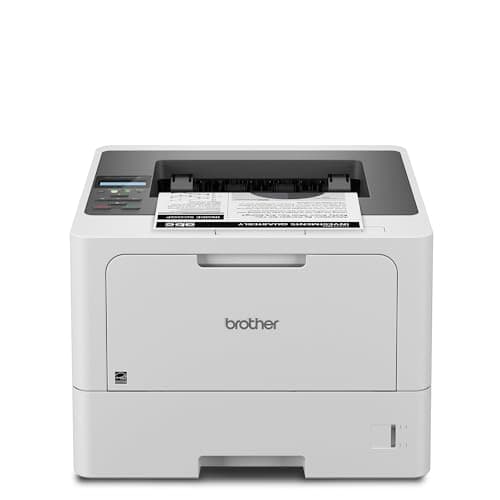
A business running payroll or supplier payments wants a second paper source that holds a stack rather than a sheet. The 100-sheet multi-purpose tray on this machine takes a run of check stock on a straighter path, while the 250-sheet main cassette keeps letterhead and plain paper loaded underneath.
$329.99 at list, up to 48 pages a minute, Gigabit Ethernet, and the lowest toner cost of the three here: the TN920XXL is rated at 11,000 pages, about 1.9 cents each. Our high-volume picks.
#ad — we may earn a commission. How this site is funded. Prices as shown on Amazon as of October 17, 2026; Amazon’s own page is the price of record.
~3.3¢ per mono page
Based on a Brother TN830XL high-yield toner cartridge rated at 3,000 pages at $98.29, priced on 27 September 2026.
Brother TN830XL high-yield toner cartridge — rated 3,000 pages (ISO/IEC 19752), $98.29 at Brother USA, checked 27 September 2026
Yields are manufacturer-rated at the ISO 5% page-coverage standard, not measured by us, and real-world cost runs higher. Prices are not live: this is arithmetic on a price we read on the date shown, not a current price. How we calculate cost per page.
Dual-band wireless (2.4 GHz / 5 GHz), Ethernet or USB
Subscription
None required
What we like
Toner does not dry out, so it is ideal if you print in occasional bursts
Automatic two-sided printing at 36 pages per minute
Brother has publicly denied blocking third-party toner with firmware
What you give up
Black only - no color at all
Cost per page is roughly ten times a tank printer's
The 700-page starter cartridge runs out fast; budget for a TN830XL
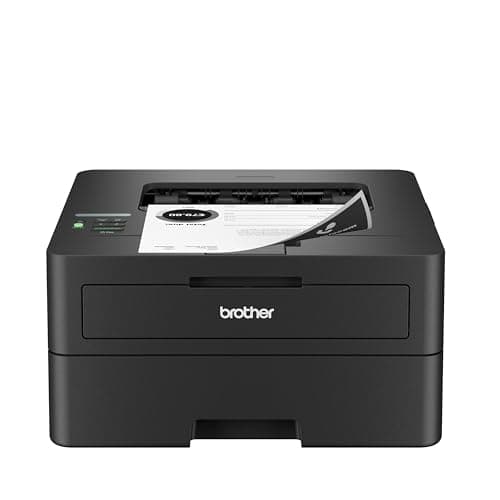
If checks are a monthly chore rather than a weekly process, this is the printer: $179.98 less than the business machine, running the same TN830 cartridge family at about 3.3 cents a page. Print-only, mono, up to 36 pages a minute, with dual-band wireless, Ethernet and USB.
Brother does not publish a multi-purpose tray or a manual feed slot on it, so check stock goes through the main cassette — fine for a few sheets, less convenient if you swap paper constantly. Toner does not dry out, which suits a printer used once a month.
The Brother MFC-L2820DW at $279.99, because its single-sheet manual feed slot takes heavier check stock without unloading your plain paper, and it runs at about 3.3 cents a page. For volume, the HL-L5210DW at $329.99.
+−Do you need a laser printer to print checks?
It is strongly preferable. Fused toner does not smudge, does not run when damp and is much harder to alter than liquid ink, which is why business check printing has always been laser.
+−Do I need MICR toner to print checks?
Only if you are printing the MICR line itself onto blank stock. Printing payee, amount and date onto pre-printed check stock that already carries the MICR line needs nothing special. Confirm with your bank either way.
+−Can you print checks from QuickBooks on a home printer?
Yes — accounting software lays out the fields and the printer simply prints them. Use pre-printed check stock matched to the layout your software expects, feed it from the manual slot, and proof on plain paper first.
+−How much does it cost to print a check at home?
A fraction of a cent in toner on the machines above — about 3.3 cents for a full ISO page of text, and a check uses far less. The check stock costs more than the printing does.
+−Can I print checks on an inkjet printer?
You can, but we would not. Inkjet print needs drying time, smudges under a thumb and is easier to alter with solvent, and an inkjet used once a month is also the most likely to clog.