Almost every page on this site ends in a number: cents per page, dollars over three years, the volume at which one printer overtakes another. This page cannot. HP publishes rated yields for the Smart Tank 7001’s ink bottles and does not publish a price we could read for either of them, and without both halves there is no cost per page. What follows is everything we can actually stand behind about this printer, a plain account of what is missing, and what we would buy instead.
The missing number, and why we will not fill it in
Our method is one line: cost per page is the supply price divided by the manufacturer’s rated page yield. HP gives us the second half. On 27 September 2026 we could not read a price for the HP 32XL black ink bottle (135 mL) or the HP 31 color ink bottle (70 mL) from HP, and when we went back on 4 November 2026 HP’s support page for the Smart Tank 7000 series and its US store page for this model both timed out or refused the request.
Third-party sellers do list both bottles, at a spread of prices wide enough that quoting any one of them would be picking a number rather than reporting one. So we do not. Every other printer on this site carries a cost per page drawn from the maker’s own published supply price, and this one carries a blank, because that is what honest looks like when an input is missing. Our method in full · what we do and do not do.
What HP does publish
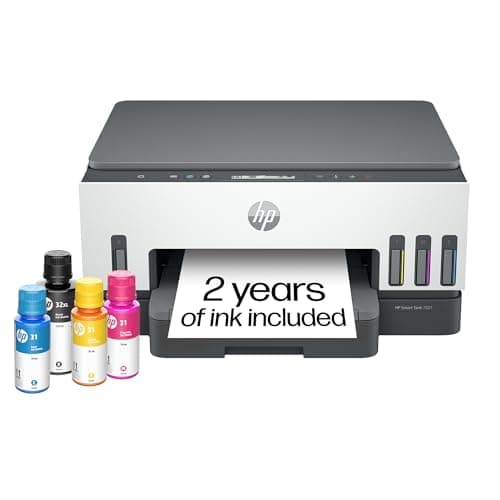
The specification page we read gives a flatbed scanner, wireless networking, and a four-channel bottle system: one HP 32XL black ink bottle at 135 mL, rated at 6,000 pages, and cyan, magenta and yellow 70 mL bottles rated at 8,000 pages each.
Those are high rated yields, and the color figure is the striking one: eight thousand rated pages per color bottle is more than any other color supply in our registry. If HP’s bottles are priced anywhere near Epson’s or Canon’s, this printer is cheap to run. We simply cannot show you that it is.
What the page does not state is a print speed, an automatic two-sided printing capability, or an automatic document feeder. Retail listings disagree with each other on the duplex question, which is reason enough for us to leave it alone: “not published” means HP does not say it on the page we read, which is not the same as a confirmed absence. If two-sided printing or a document feeder is a requirement, buy a printer whose maker states it plainly — our auto-duplex tank picks and our ADF picks only list machines where the manufacturer publishes the feature.
The part HP genuinely gets right
It is worth separating the brand from the hardware, because this site is harder on HP than on anyone else and the Smart Tank does not deserve the same criticism as HP’s cartridge range. A bottle-fed printer has no chipped cartridge to authenticate, which means there is no mechanism of the kind behind HP Dynamic Security — the firmware system that has disabled third-party cartridges on HP’s cartridge printers. You pour ink into a tank. The tank does not know where the ink came from.
Nor does it need a subscription. No Instant Ink plan is required for the printer to print, there is no monthly page allowance, and nothing stops working if you never enroll. That is a materially different arrangement from a printer that goes quiet when a plan lapses, and it is the distinction this whole site is organized around. Do HP printers require a subscription?
The caveat is marketing rather than mechanism: HP promotes its subscription plans hard across its printer range, and plenty of buyers have arrived at this site precisely because an HP printer made a plan feel compulsory. On a Smart Tank it is not. If you have already been through that and want out, how to cancel Instant Ink and the alternatives are the two pages to read.
Against the tanks we can cost out
| HP Smart Tank 7001 | Epson ET-4800 | Canon MegaTank G3270 | |
|---|---|---|---|
| Ink | Bottles (HP 32XL / 31) | Bottles (Epson 502) | Bottles (Canon GI-21) |
| Rated black yield | 6,000 pages | 7,500 pages | 6,000 pages |
| Supply price published by the maker | Not readable on the date we checked | $24.99 | $17.99 |
| Mono cost per page | No figure - see above | ~0.3¢ | ~0.3¢ |
| Color cost per page | No figure - see above | ~1.2¢ | ~0.8¢ |
| Subscription required | No | No | No |
| Document feeder | Not published | Published | Not published |
Rated yields and supply prices read from each manufacturer's own pages on the dates listed in our sources. Cost per page is our arithmetic on those prices. Blank cells are missing inputs, not zeroes.
This is the comparison that decides it. Two other makers sell the same idea — bottles, no cartridges, no plan — and publish what the bottles cost, so a buyer can work out the five-year bill before spending anything. A printer bought specifically to make ink costs predictable is a strange thing to buy from the one maker that will not tell you the ink price. EcoTank against MegaTank against Smart Tank sets the three ranges side by side.
Who should buy it anyway
There is a real reader for this printer, and it is not a grudging one. Someone already inside HP’s world — HP drivers that work, an HP account, an office that standardized on the brand, a strong preference for the HP Smart app — who wants off cartridges without changing brands. For that person the Smart Tank is exactly the right shelf to be looking at, and the 7001 sits in the middle of it.
It is also a fair buy if you have a current retail price in front of you for both the printer and a black bottle. That is two numbers and a division, and it turns this page’s blank into your own answer. The price button here goes to a live listing for exactly that reason.
One thing all tank printers share
Liquid ink dries in a print head that sits unused, and bottle-fed printers are not exempt. If your printing is genuinely occasional — a handful of pages a month, with gaps of weeks — dry toner is the more forgiving technology and a small mono laser is the better buy whatever the brand. What clogging is, and how to avoid it · what to buy if you print rarely.
Who should buy something else
- You want to know what it costs before you buy. Then buy a printer whose maker publishes a bottle price. The ET-4800 and the MegaTank G3270 both do, and both come out very cheap per page.
- You need a document feeder or two-sided printing. HP does not state either on the page we read. Buy from the ADF list or the auto-duplex list, where every entry has the feature published by its manufacturer.
- You are avoiding HP on principle. That is a defensible position and we are not going to talk you out of it — the Dynamic Security history is why. Note only that it concerns cartridge printers, not tanks. Which printer brands do not push a subscription.
- You print mostly black text, in volume. A mono laser is faster, immune to drying out and cheaper to buy. Laser printers with genuinely cheap toner.
- You print photographs. Six-color ink and borderless output are what that needs, and the EcoTank Photo ET-8550 is the machine on this site built for it.